I recently set up something I have wanted for a while: a hybrid AI agent system where my everyday agent can use both cloud models and a local model running on my own hardware.
The goal was not to replace cloud models completely. The goal was to build a more flexible system.
I wanted OpenClaw to keep using a strong cloud coding model for serious work, but I also wanted the option to route certain tasks to a local model running on my MacBook Pro. That local model could handle summaries, planning, Obsidian vault work, lightweight code review, and small file edits without burning cloud quota or waiting on rate limits.
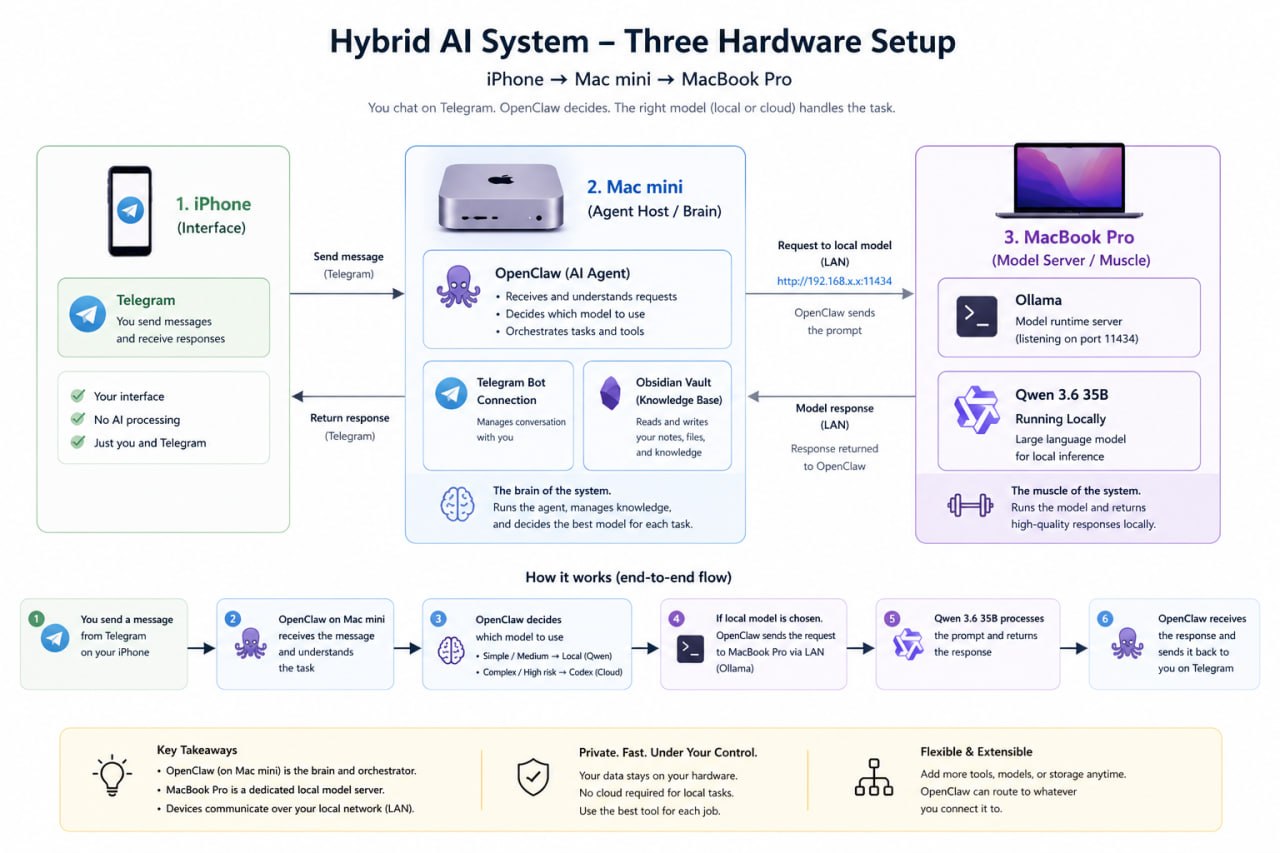
The end result looks like this:
Telegram chat
 ↓
OpenClaw running on Mac mini M4
 ↓
Cloud Codex model for primary heavy work
 ↓
Local Qwen model over LAN for secondary/local work
 ↓
Ollama running on MacBook Pro M2 Max with 96GB RAM
This post is both a writeup of the experiment and documentation for how I set it up.
The Vision #
My OpenClaw bot already runs on a Mac mini M4 with 16GB of RAM. That machine is great as a lightweight always-on agent host, but it is not the machine I want to use for large local models.
My MacBook Pro is the opposite. It is not always the machine I want running my bot full time, but it has much more memory: an M2 Max with 96GB RAM. That makes it a much better host for large local models.
So the idea was simple:
- Keep OpenClaw running on the Mac mini.
- Run the local model on the MacBook Pro.
- Expose the MacBook’s Ollama server over my local network.
- Add that Ollama server to OpenClaw as a secondary provider.
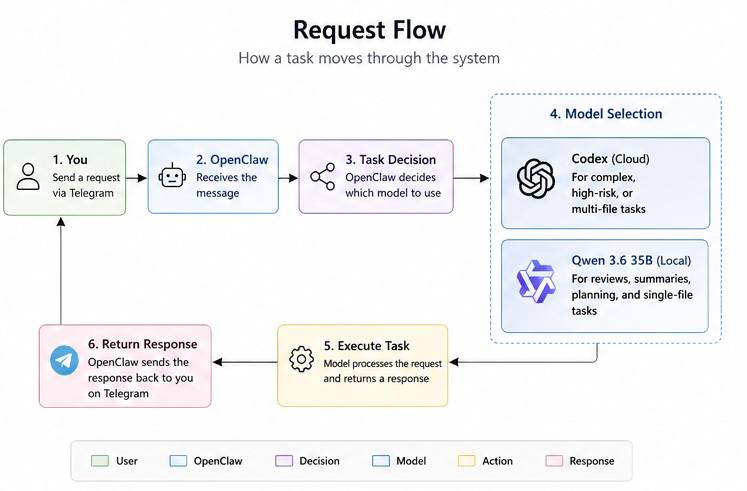
- Keep Codex as the primary model.
- Use the local model intentionally for safe, lower-risk tasks.
I did not want to make the local model the default immediately. Local models are getting very good, but agent workflows are hard. Agents need to follow instructions, use tools correctly, respect file boundaries, and avoid hallucinating what they changed.
So this became a staged test:
- Can OpenClaw reach the local model?
- Can it route a task to it?
- Can the local model summarize project context accurately?
- Can it suggest a small improvement?
- Can it create one new file without modifying anything else?
- Can it patch one specific file safely?
That gave me a much better sense of where the local model fits.
Hardware Used #
The setup used two Macs:
Mac mini M4 #
This is where OpenClaw runs.
- 16GB RAM
- Always-on agent host
- Telegram integration already configured
- OpenClaw gateway running as a local service
MacBook Pro M2 Max #
This is where the local model runs.
- 96GB RAM
- Ollama installed
- Local Qwen model downloaded
- Exposed to the Mac mini over the LAN
The key idea is that the agent does not need to run on the same machine as the model. The model just needs to be reachable over the network.
The Model #
For this test, I used:
qwen3.6:35bThis is large enough to be useful for reasoning and code-related tasks, but still practical on a 96GB Apple Silicon machine.
I would not try to run this as the main model on the 16GB Mac mini. The Mac mini is the agent host. The MacBook Pro is the local inference box.
That division of labor matters.
Step 1: Download the Model in Ollama #
On the MacBook Pro, I downloaded the model with Ollama:
ollama pull qwen3.6:35bAfter it finished, I verified that Ollama could see it:
ollama listAnd I could run it directly:
ollama run qwen3.6:35bAt this point the model existed locally on the MacBook Pro, but OpenClaw running on the Mac mini still could not reach it. By default, Ollama usually listens only locally.
So the next step was exposing Ollama to the local network.
Step 2: Find the MacBook Pro’s LAN IP Address #
On the MacBook Pro, I ran:
ipconfig getifaddr en0
ipconfig getifaddr en1
That returned the MacBook’s local network IP address. In my case, it was something like:
192.168.1.42I will use that as the example IP below.
Step 3: Start Ollama on the Local Network #
Still on the MacBook Pro, I started Ollama so it would listen on the LAN:
OLLAMA_HOST=0.0.0.0:11434 ollama serveThis tells Ollama to listen on all network interfaces, not just localhost.
That terminal needs to stay running unless Ollama is configured another way as a service.
Security note: I did not expose this to the public internet. This is for my local network only. Do not port-forward Ollama’s port to the internet.
Step 4: Verify Ollama Locally #
On the MacBook Pro, in another terminal tab, I checked the local Ollama API:
curl http://127.0.0.1:11434/api/tagsThat returned JSON showing the available Ollama models.
Step 5: Verify Ollama from the Mac mini #
Then I went to the Mac mini and tested whether it could reach the MacBook Pro’s Ollama server:
curl http://192.168.1.42:11434/api/tagsThis was the first important milestone.
If the Mac mini can hit that endpoint and see the model list, then OpenClaw should also be able to talk to that model server.
Step 6: Check OpenClaw Version and Status #
On the Mac mini, I checked OpenClaw:
openclaw --version
openclaw status
I also restarted the gateway after configuration changes:
openclaw gateway restartIn my case, OpenClaw was running as a LaunchAgent on macOS, and the restart output confirmed that the gateway service came back up.
Step 7: Add the Local Model as a Secondary OpenClaw Provider #
Rather than manually editing the configuration myself, I gave OpenClaw a careful instruction over Telegram.
The important part was that I did not want to replace my working Codex setup. I wanted to add the local model as a secondary provider.
Here is the prompt I gave OpenClaw:
Configure yourself to add an Ollama provider that points to my MacBook Pro local model server.

Use:
Provider: Ollama
Base URL: http://192.168.1.42:11434
Model: qwen3.6:35b

Also enable agents.defaults.experimental.localModelLean = true if my installed OpenClaw version supports it.

Do not remove or overwrite my existing Codex/OpenAI provider. Keep Codex as the primary/default provider for now. Add the local Ollama model as an available secondary provider named something like local-qwen.

After changing config, restart the OpenClaw gateway if needed, then run a harmless test using the local model: ask it to summarize the current OpenClaw configuration without editing files.
OpenClaw reported back that it had:
- Kept Codex/OpenAI as the primary/default provider.
- Added a secondary Ollama provider named
local-qwen. - Set the base URL to the MacBook Pro’s Ollama server.
- Added the model as
local-qwen/qwen3.6:35b. - Enabled
agents.defaults.experimental.localModelLean = true. - Restarted the OpenClaw gateway.
- Verified that the MacBook Ollama host was reachable.
- Verified that
openclaw models list --provider local-qwenshowed the new model.
That meant the hybrid setup was live.
Why localModelLean Matters
#
One useful OpenClaw setting here is:
{
  "agents": {
    "defaults": {
      "experimental": {
        "localModelLean": true
      }
    }
  }
}
The point of localModelLean is to make local model usage less bloated by dropping heavyweight default tools from the prompt.
That matters because local models are more sensitive to prompt size, tool complexity, and context overhead.
With cloud models, you can often get away with massive tool definitions and complicated agent instructions. With local models, it helps to simplify the tool environment so the model has a cleaner job.
For my use case, local lean mode makes sense because I am not trying to use the local model as the full autonomous everything-agent. I am using it for targeted work:
- Summaries
- Planning
- Markdown drafting
- Obsidian vault maintenance
- Small code reviews
- Small constrained edits
For large refactors, deployment changes, or complex coding tasks, I still want the cloud model as the primary brain.
Step 8: First Safe Test #
The first test was intentionally harmless.
I asked OpenClaw:
Use local-qwen/qwen3.6:35b to summarize the current project, the Obsidian vault project. Do not edit files.It pulled context from the workspace and returned a useful summary of the vault project:
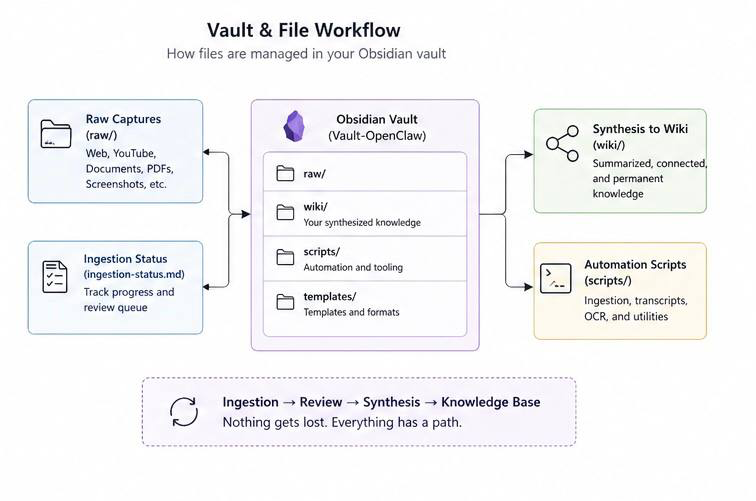
- The vault is a separate OpenClaw-focused Obsidian vault.
- It keeps agent work distinct from my personal vault.
- It uses a raw versus wiki structure.
raw/contains immutable captured source material.wiki/contains synthesized knowledge.- The project has ingestion utilities for YouTube, web articles, PDFs, images, and audio.
- The Telegram intake topic acts as the media inbox.
- Material is captured first and synthesized later.
That was a good sign. The local model was not just responding. It was correctly understanding the project.
Step 9: Ask for One Small Improvement #
Next, I asked:
Use local-qwen/qwen3.6:35b to review this project and suggest one small improvement. Do not edit files.The model suggested adding an ingestion status tracker.
The idea was simple: since the vault has a raw/ area for captured sources and a wiki/ area for synthesized knowledge, there should be a lightweight way to track which raw captures are still raw, which are ready for review, and which have been synthesized.
That suggestion fit the project well.
It was small, practical, and aligned with the existing architecture.
Step 10: Ask the Model to Critique Itself #
Before creating anything, I asked the local model to critique its own suggestion:
Use local-qwen/qwen3.6:35b to critique its own previous suggestion and identify one potential downside or failure mode.It pointed out that a single markdown table could get clumsy as the number of raw records grows.
That was a good critique. Long markdown tables in Obsidian can become annoying quickly. They are easy to break, hard to scan, and not as pleasant to edit as simple dated bullet sections.
So we adjusted the design before writing the file.
Step 11: First Local Model Write Task #
Then I gave the local model a constrained write task:
Use local-qwen/qwen3.6:35b to implement the ingestion-status tracker using dated bullet sections instead of a markdown table. Create only the new tracker file. Do not modify existing files.OpenClaw created one new file:
/Users/drew/Documents/Vault-OpenClaw/ingestion-status.mdThe file used dated bullet sections instead of a large table.
That was the first real proof that this setup was not just good for summaries. It could safely create a small file under tight constraints.
Step 12: A Small Patch Test #
After reviewing the file, I noticed the status legend needed one more state: pending-review.
So I gave another tightly scoped instruction:
Use local-qwen/qwen3.6:35b to update only /Users/drew/Documents/Vault-OpenClaw/ingestion-status.md by adding a [pending-review] status to the Status Legend. Do not modify any other files.OpenClaw updated only that file and added:
[pending-review]— captured and extraction complete but awaiting human evaluation for synthesis decision
That tested a different behavior: not just creating a new file, but patching an existing one without wandering into other files.
It passed.
What This Proved #
This experiment proved several things.
1. Telegram Still Works as the Interface #
Changing the model did not break the chat workflow.
Telegram is just the interface. OpenClaw still receives messages and sends replies the same way. The model behind the scenes can be Codex, Qwen, or something else.
That separation is powerful.
2. The Mac mini Can Stay Lightweight #
The Mac mini does not need to run the large model.
It can remain the always-on coordination machine while the MacBook Pro provides local inference when needed.
3. Local Models Are Useful, but Should Be Scoped #
The local Qwen model performed well on:
- Summarization
- Project review
- Small improvement suggestions
- Creating a single markdown file
- Updating one specific file
That is genuinely useful.
But I would not immediately trust it with everything.
For now, my model split is:
Codex/cloud model:
- serious coding
- large refactors
- deployment fixes
- complex multi-file work
- anything that could break the agent setup
local-qwen/qwen3.6:35b:
- summaries
- planning
- markdown drafting
- Obsidian vault work
- small single-file edits
- code review suggestions
That is the sweet spot.
Final Architecture #
The working architecture is now:
Telegram
 ↓
OpenClaw on Mac mini M4
 ↓
Primary provider: Codex/OpenAI
 ↓
Secondary provider: local-qwen
 ↓
Ollama API over LAN
 ↓
Qwen3.6 35B running on MacBook Pro M2 Max, 96GB RAM
The local model is not replacing the cloud model. It is extending the system.
That is the key point.
The hybrid setup gives me:
- A strong cloud model when I need maximum capability.
- A local model when I want privacy, lower cost, quota relief, or fast experimentation.
- A single Telegram interface to talk to both.
- An agent that can route work to the right backend.
This is the direction I want my personal AI system to go: not one model, not one interface, not one cloud dependency, but a flexible mesh of tools and models that I control.
Commands Used #
Here are the main commands from the setup.
On the MacBook Pro #
Download the model:
ollama pull qwen3.6:35bList models:
ollama listFind the MacBook Pro LAN IP:
ipconfig getifaddr en0
ipconfig getifaddr en1
Start Ollama on the local network:
OLLAMA_HOST=0.0.0.0:11434 ollama serveTest Ollama locally:
curl http://127.0.0.1:11434/api/tagsOn the Mac mini #
Test access to the MacBook Pro’s Ollama server:
curl http://192.168.1.42:11434/api/tagsCheck OpenClaw:
openclaw --version
openclaw status
Restart OpenClaw gateway:
openclaw gateway restartUseful verification command once the provider is configured:
openclaw models list --provider local-qwenThe OpenClaw Configuration Request #
This was the key instruction I gave OpenClaw:
Configure yourself to add an Ollama provider that points to my MacBook Pro local model server.

Use:
Provider: Ollama
Base URL: http://192.168.1.42:11434
Model: qwen3.6:35b

Also enable agents.defaults.experimental.localModelLean = true if my installed OpenClaw version supports it.

Do not remove or overwrite my existing Codex/OpenAI provider. Keep Codex as the primary/default provider for now. Add the local Ollama model as an available secondary provider named something like local-qwen.

After changing config, restart the OpenClaw gateway if needed, then run a harmless test using the local model: ask it to summarize the current OpenClaw configuration without editing files.
That prompt is worth saving because it captures the most important rule: add the local model as a secondary provider without breaking the primary provider.
Lessons Learned #
The biggest lesson is that local models are not all-or-nothing.
I do not need to choose between cloud AI and local AI. A better setup is to use both.
Cloud models are still better for the hardest coding and reasoning tasks. Local models are increasingly good for personal workflows, private notes, summaries, drafting, and constrained edits.
The second lesson is that agent reliability depends on scope. The local model worked well because I gave it narrow tasks:
- Do not edit files.
- Create only one new file.
- Update only this one file.
- Show the result.
That is how I plan to keep using it.
The third lesson is that my Obsidian vault is a perfect testing ground for local AI. It is markdown-first, readable, versionable, and forgiving. A local model can help organize and synthesize knowledge without needing to touch production code.
Where I Want to Take This Next #
The next step is smarter routing.
Right now, I can explicitly tell OpenClaw:
Use local-qwen/qwen3.6:35b...Eventually, I want OpenClaw to make better automatic decisions:
- Use local Qwen for summaries, notes, and small markdown changes.
- Use Codex for serious coding and multi-file edits.
- Use local models for Obsidian memory workflows.
- Use cloud models only when the task truly needs them.
That would make the system feel less like one chatbot and more like a personal AI workstation.
A local model for memory and notes. A cloud model for heavy coding. A Telegram interface for convenience. Obsidian as the long-term knowledge base.
That is the bigger vision.
This experiment was a small step, but it made the architecture real.